Printer Policy
Purpose and Statements
3D printing is a courtesy service provided to all members of the public who visit TPL, and not limited specifically to patrons or program attendees.
This policy explains the terms and conditions for using the 3D printing service at the library. Before items can be printed, member must agree to these terms and conditions, and agree not to hold Terrace Public Library responsible for any consequences arising from misuse of the service.
These terms and conditions may be changed later. Revisions to this policy will be noted on the library website.
Requirements
Anyone can use the 3D Printer, once they have spoken directly to a TPL staff member. Requests can be given either in-person or via email at programs@terracelibrary.ca.
As of April 2026, the Library has two printers:
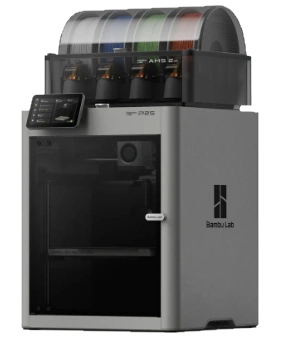
- Bambu P2S - Primary
- Ultimaker 3 - Secondary
Submissions will generally be printed on a first-come, first-served basis in the order they are approved.
Modifications
Members of the public are responsible for making any modifications to submitted designs — if there is a need to change their design, they must cancel their pending request by email, make any changes themselves, and resubmit. Modifications cannot be made once an item has been printed.
Examples of design modifications include:
- Adding or removing elements from the design.
- Increasing or decreasing the item size.
Guarantees
Staff will attempt to ensure submissions are printed successfully.
However, Terrace Public Library does not guarantee:
- Successful printing of submitted designs.
- Professional-level print quality.
- Printing and pickup dates for approved submissions.
- Free prints: If a printing error has occurred that is a result of production mistake (i.e. damage due to lifting off the plate, malformed sections of a print, etc.), a reprint will be offered at no cost on free 3D printed model(s). Reprints must use the same file as was used in the original order.
- Patrons are not entitled to submit any new file for the reprint. TPL Staff Members will decide if a full or partial reprint will be granted. Any error caused/created by the design file itself is not entitled to a reprint.
Limitations
The following limitations apply to all submitted jobs:
- Submitted print requests are limited to the size of the two printers printing bed sizes and height. Prints may be resized by Director.
- A 3D print job request must not exceed 8 hours, as prints do not run before or after library open hours.
- TPL uses PLA (Polylactic Acid) plastic, which is not suitable for all applications due to a low melting point (between 170 and 180 Degrees Celsius), and vulnerability to moisture (degrades the plastic over time).
Inappropriate Submissions
As the 3D printer is a courtesy service, TPL reserves the right to refuse to print designs on any ground, but the following items will not be printed for any reason:
- Weapons (Guns, knives, etc.) or other objects that pose a threat to the well-being of others.
- Sexually explicit materials.
- Discriminatory or offensive materials.
- Any components or parts of the above.
Permissions
Users must accept all responsibility for ensuring that their submission does not violate any of the following regulations:
- Canadian intellectual property legislation, including copyright, trademark, and patent laws — patrons must have permission to use submitted designs that are not their own.
- Other municipal, provincial, or federal laws that apply.
Fees
The cost of material used is $0.20 per gram. This cost is subject to change.
Print Pickup
Staff will contact patrons via email (or phone) when items are ready, and payment for items will occur when patrons arrive for pickup. Patrons can pay using cash or debit payment methods at the library desk for items before release.